| Key Takeaways |
|---|
| • You have 5 days to report a problem in the LawnStarter app. That is 2.5 to 5 times longer than the 24- to 48-hour industry standard. • LawnStarter charges your credit card 3 days after the service, giving you time to inspect before you pay. • If you’re not satisfied, you have 3 options: You can choose a credit (depending on the service), return visit, or a new provider and a full refund. |

If a lawn care or outdoor services job doesn’t go as expected, LawnStarter gives you 5 days to report a problem. Depending on the issue, you can choose a credit, return visit, or a new service provider and a full refund.
This article explains exactly how LawnStarter handles complaints and disputes: how to file a complaint, what your options are, what the provider is required to do, and what happens if he or she doesn’t follow through.
LawnStarter reports a 95% customer satisfaction rate, so if you are looking for quality lawn care, find a LawnStarter mowing pro today.
How Billing and Inspection Work Before You Dispute
LawnStarter doesn’t charge your credit card at signup or on the day of service. Under the Inspect First, Pay Later model, your credit card is charged 3 days after the job is completed, giving you time to look over the work before payment is taken.
That window matters for disputes: If you notice a problem and report it before your credit card is charged, billing is suspended for 7 days.
See Related: First-Time Lawn Care Guide: What to Expect from LawnStarter
How to Report a Problem with a LawnStarter Service
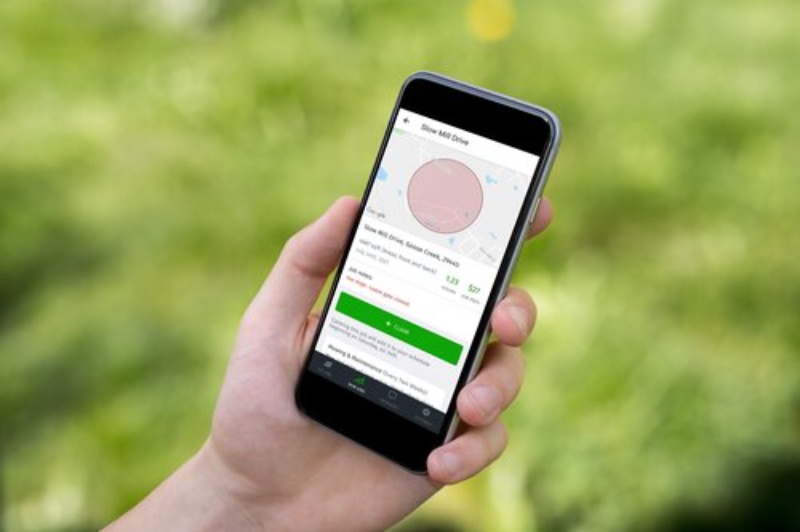
There are 2 ways to report a problem on the LawnStarter app, one for recurring mowing services and the other for one-time non-mowing services:
- To report an issue with a recurring mowing service: In the app, rate your completed mowing service with 3 stars or fewer, or click “Report a problem.” Describe the issue with your yard, and follow the steps in the app.
- To report an issue with a one-time non-mowing service: Select the particular service in the app, and tap “Report a problem.”
You have 5 days after the service to report a problem and get a re-mow or a refund. This is the Done Right Guarantee. LawnStarter’s service guarantee covers mowing and non-mowing services.
When you report a problem, you’ll be asked to describe what went wrong. There are 3 options:
- Quality: The work was done, but not up to standard. For example, if the pro failed to edge and blow clippings off the hard surfaces.
- No work done: The pro marked the job complete, but no service was performed.
- Partial completion: The job was only partially done.
Next, you’ll be asked to describe the issue in more detail and where the issue is in your yard.
Then your resolution options will pop up.
There is one exception. If you negotiated a price with your pro, you can’t dispute the service in the app. Contact LawnStarter Support directly at 866-822-1766, and we’ll handle the resolution.
Note: Reporting a problem through the app is the easiest, fastest, and preferred way. But if you’d like to speak with someone, you can call customer support or report a problem via your online account.
What Resolution Options You Have

Once you’ve reported a problem, LawnStarter gives you 3 options, depending on the issue:
- Accept a credit. A credit is applied to your LawnStarter account. The amount is based on the dispute type. Your current provider continues with your next scheduled visit as normal.
- Request a return visit. The same lawn mowing or other service provider is asked to come back to redo the work at no cost to you. LawnStarter notifies the pro, who has 48 hours to accept and schedule a return visit. There’s no additional charge for the return job.
- Request a new pro and a full refund. LawnStarter refunds 100% of the service fee and tax and assigns a different pro to your account.
What the Pro Has to Do
If you request a fix, LawnStarter notifies your pro and gives them 48 hours to respond. If the pro accepts, he or she schedules a return visit. The return visit costs you nothing.
If the pro declines, LawnStarter treats this the same as a non-response: You receive a full refund, and a new pro is assigned to redo the service.
What Happens If the Pro Doesn’t Respond
If your provider doesn’t respond within 48 hours, LawnStarter’s system automatically resolves the dispute in your favor: You’re issued a full refund and reassigned to a new pro to resolve the issue. No action is needed on your end.
Property Damage Claims
If something on your property was damaged during a service (like a sprinkler head, fence, etc.), that’s handled separately under LawnStarter’s $2 Million Property Protection Pledge. Report damage separately through the app with photos, and LawnStarter will repair or reimburse any verified loss.
FAQ
No. The Done Right Guarantee dispute window is 5 days from service completion. After that, the in-app dispute option is no longer available. If you have an extenuating circumstance, contact LawnStarter Support directly. They can review the situation, but they cannot guarantee a resolution outside the standard window.
Yes, but tips are refunded in a separate transaction from the service refund. A service refund covers only the job price and tax.
Canceling a future service and disputing a completed service are separate processes. A dispute is for a job that’s already been marked complete but didn’t meet your expectations.
If you want to stop future services, you can cancel in the app, although LawnStarter requires a minimum of 3 completed mowing services before your plan can be canceled.
You can request a pro change in the app or through the website at any time. If a service was completed but you’re unhappy with the quality of the service or you don’t think your pro is a good fit, you can change your lawn care provider.
What Happens When Things Go Wrong
LawnStarter’s dispute process is built around a clear sequence and an above-industry-standard review window: Inspect the work before you’re charged, report within 5 days if something’s off, choose either a credit, return visit, or a new pro plus a full refund.
Get an instant free mowing quote →
Read More: What Lawn Care Services Does LawnStarter Offer? (Full List)
Main Image: LawnStarter complaint resolution and refund options graphic. Image Credit: sulit.photos / Adobe Stock edited using Canva Pro
Related Posts: